APPS4IDEVICES REBIRTH
  • 3
  • Home
  • Blog
  • All Apps
  • Best setup for....
  • Contact
  • Free ressources
  • Ed's world
    • Sample Packs
    • DigiStix & EG Pulse Drum Kits 1

Auddly v2.31.7 (Secure & Share your audio files / Save place in your iDevices)

5/19/2019

0 Comments

 
Picture
Today, I would like to talk about a Free App from the App Store
A Free App that I am using a lot....

Auddly
But before to start this review, I have to tell you something...
The reasons why I am using Auddly are not the reason why this App has been created...

Auddly is a sharing App for musicians / Pro musicians / Composers / Publishers / Author ..
Musicians & Pro musicians ?
Check out the App Store description....

Now I will tell you the reasons why I am using this App...
After I decided to live like a monk, I mean to live with the strict minimum, I mean with 1 iPad only and no more Macintosh I have to save space in my iPad... I am also really scare to lose my data if I break my iPad, if it is stolen or that if it burns like it happens to me a few months ago...
So I am using Weebly to secure all my Audios Data and to to save a lot of space into my iPad

So I using it as an unlimited WV files Cloud storage for Free as I am doing with a Google photos.
(For those who use to follow Apps4idevices I already said that the best Free Cloud drive is a website as Weebly, Universe Go.sitebuilder. The problem is that with most of this website you can not upload audio files and I am not talking about wav or Aiff files...
OK, there is Soundcloud but it's not Free...

To conclude:

This is why I am using Audity
With Audity you can upload unlimited.wav files!!!
You can create a share link too.
Tap here to check this out
The App is very simple, very study...
The only little thing that I would like to have in a future update, is the possibility to upload in background...
A Must Have for musicians!!!!
Download in the App Store

Main Window

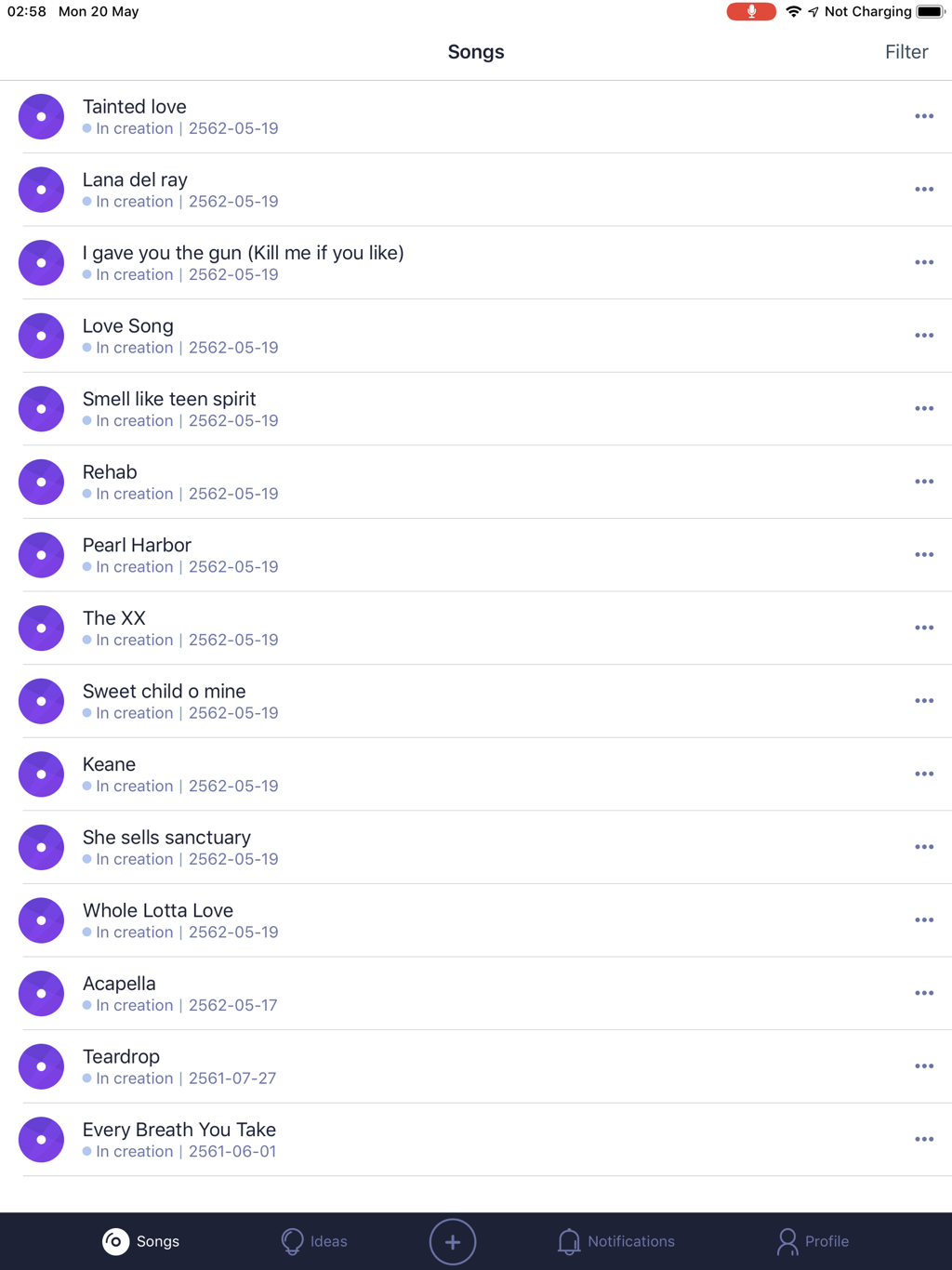
This is the mane window where all your songs are displayed.
​Song is a folder where you will be able to upload each step of the Song you are working on.
​Add Lyrics too (see below)
​As I said in my review above, I am not using Auddly to collaborate with others.
So à Song to me is the place where I upload all the relative Samples or tracks I need to play a song.
Picture
  • A Tap on the 3 points (on the right side open a pop-up where you will be able to manage your tags or delete a song
  • Tap the Song name to open the window below
  • Tap the purple circle to play the latest marked version of your song

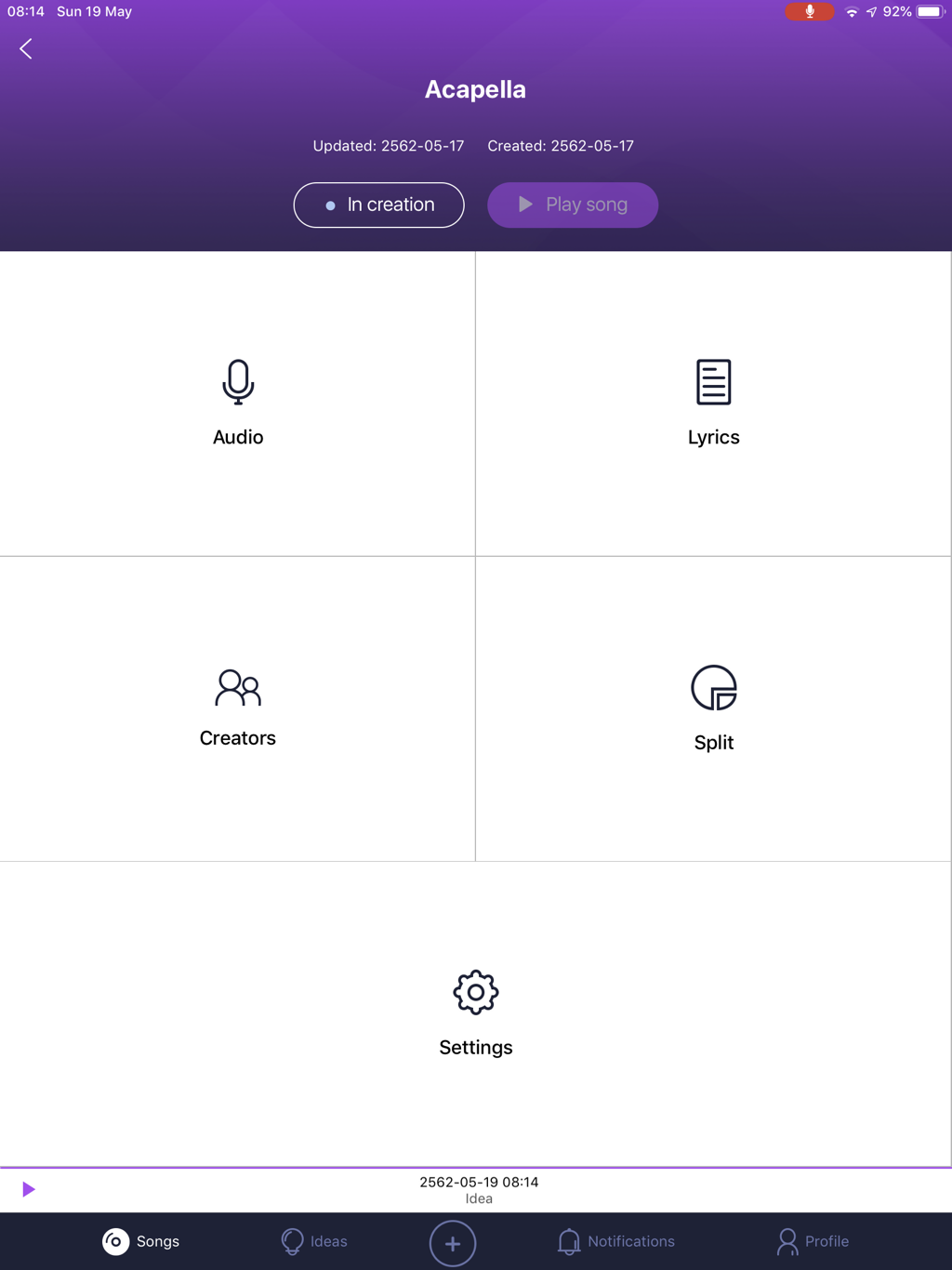
Song window

Picture
  • The Audio window: once your Audio files will be added you will be able to set the Last Version (the Play song button will be highlighted and as it's write, you will be able to play this song. (See below)
  • In the Lyrics window you will be able to write the lyrics of your song
  • Creators The creator of the song
  • Split I don' t understand ​

​The bottom of the page:
  1. Song (This picture)
  2. Idea a place where you will be able to record audio using the built in microphone of your iDevices.
  3. + open a selection pop-up window: New Song / New idea / New Lyrics
  4. Notification depending of your settings you will received if something new happened
  5. Profile

App Store description

0 Comments

Your comment will be posted after it is approved.


Leave a Reply.

    Author

    Ed
    Artistic Producer
    Composer
    Sound Engineer
     
    Band
    Black Buddha Saraband
    Nina Hagen
    popdod

    Archives

    December 2019
    November 2019
    October 2019
    September 2019
    August 2019
    July 2019
    June 2019
    May 2019
    August 2018
    July 2018
    June 2018
    May 2018
    February 2018
    January 2018
    December 2017
    November 2017
    October 2017
    September 2017
    August 2017
    July 2017

    RSS Feed

    Picture
    Picture
    Picture
    Picture
    Picture
    Picture
    Picture
    Picture
    Picture
    Picture
    Picture
    Picture
    Picture
    Picture
    Picture
    Picture
    Picture
    Picture
    Picture
    Picture
    Picture
    Because I can read everywhere a Policy...

    1. this blog is man by a human for humans
    2. I can make some mistakes (because I am a human)
    3. Nothing will deleted or removed from this blog. For my mistakes or angers, apologies and corrections will be added if needed.
    4. You can see everyday on a banner in the What's hot today post the Apps offered by a developer...
    5. If you participate to the Sunday Contest, you will have to trust in me... But, if you like you can asked me the email list of the readers who participate to a Contest included Time and Date. I will send it to you...
    6. My rating... The first criterion is the App Store description. The last one is my taste and this is totally subjective... Each post come with a tutorial showing you all the knobs, menu, faders,.... Everything that you will be able to find in an App... I hope that this will help to make your own rating.
    7. If I really don't like an App, don't understand it or found too many bugs, I send an email to the developer.... I asked him if the App will be update shortly, I also offer my services as Beta Tester.... Most of the time, I will wait for a future update... Developers are humans too!...
    8. All comments will be publish here. For insults, offenses or very bad mood, the only restriction is that you have to sign with your real name...
    9. I don't know... Peraphs that I will add something later.
Powered by Create your own unique website with customizable templates.
  • 3
  • Home
  • Blog
  • All Apps
  • Best setup for....
  • Contact
  • Free ressources
  • Ed's world
    • Sample Packs
    • DigiStix & EG Pulse Drum Kits 1