APPS4IDEVICES REBIRTH
  • 3
  • Home
  • Blog
  • All Apps
  • Best setup for....
  • Contact
  • Free ressources
  • Ed's world
    • Sample Packs
    • DigiStix & EG Pulse Drum Kits 1

TB Reverb v1.0.2

8/30/2019

3 Comments

 
Picture
TB Reverb is the most complete of the Reverbs in the app Store.
As a result, the most versatile.
The quality is impeccable, the IU perfect....
The unbeatable price!

The most complete....
  • Eco mode for lower CPU load on complex projects
  • Integrated spectrum analyser showing direct and reverb simultaneously
  • Unlimited Undo & Redo
  • AB function: compare two different settings without changing or saving a preset
  • Copy & Paste
  • Save Preset: everything is saved from the visual to the last Tab displayed
  • Multi Selection tool
  • 20 Color themes .
  • No Dry (Globa): great when you use it in an Aux, especially since this function will not be affected when you change presets.
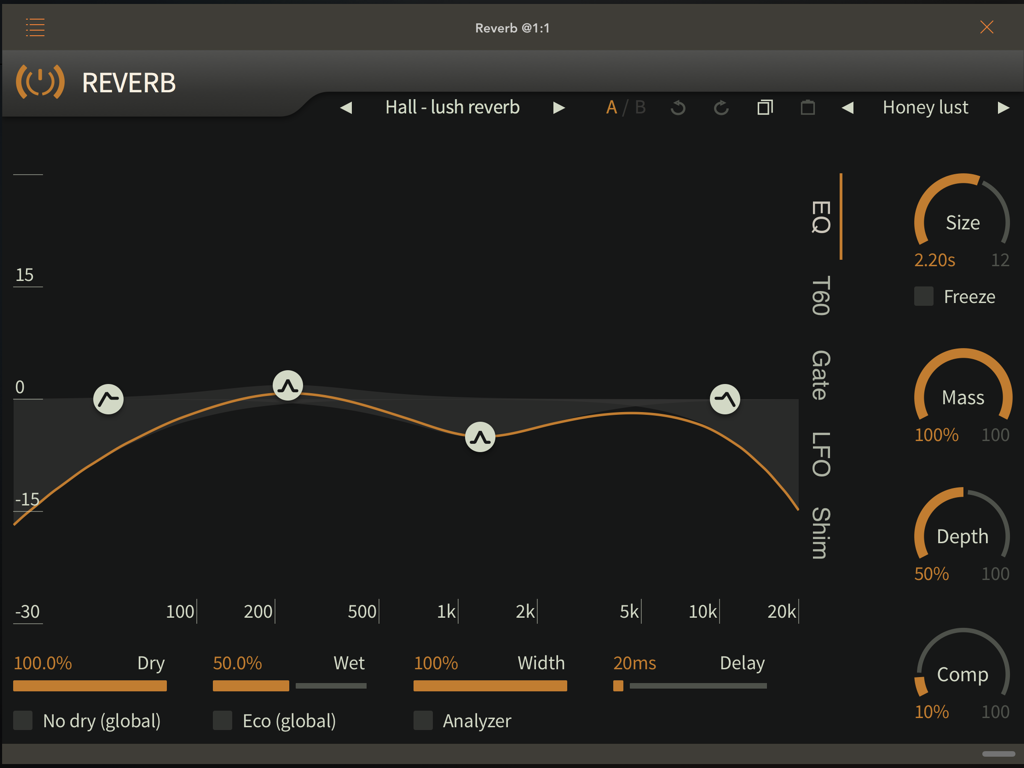
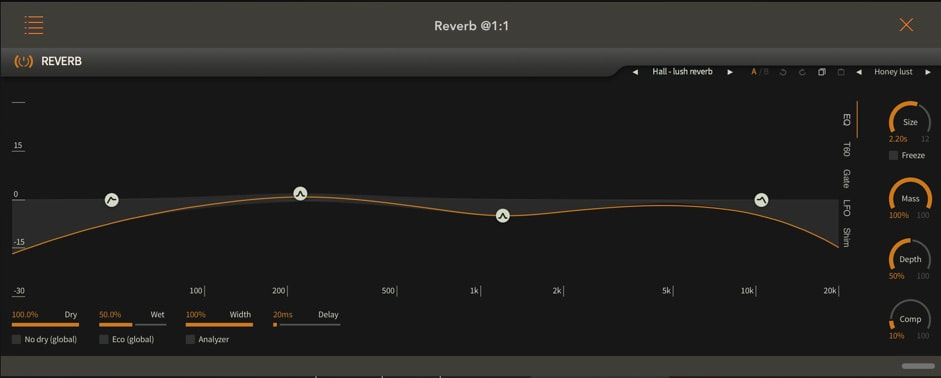
  • EQ: Tab: Low Pass & High Pass filter with a Q + 2 nodes that you can place where you want. (Gain, Frequency & Q)
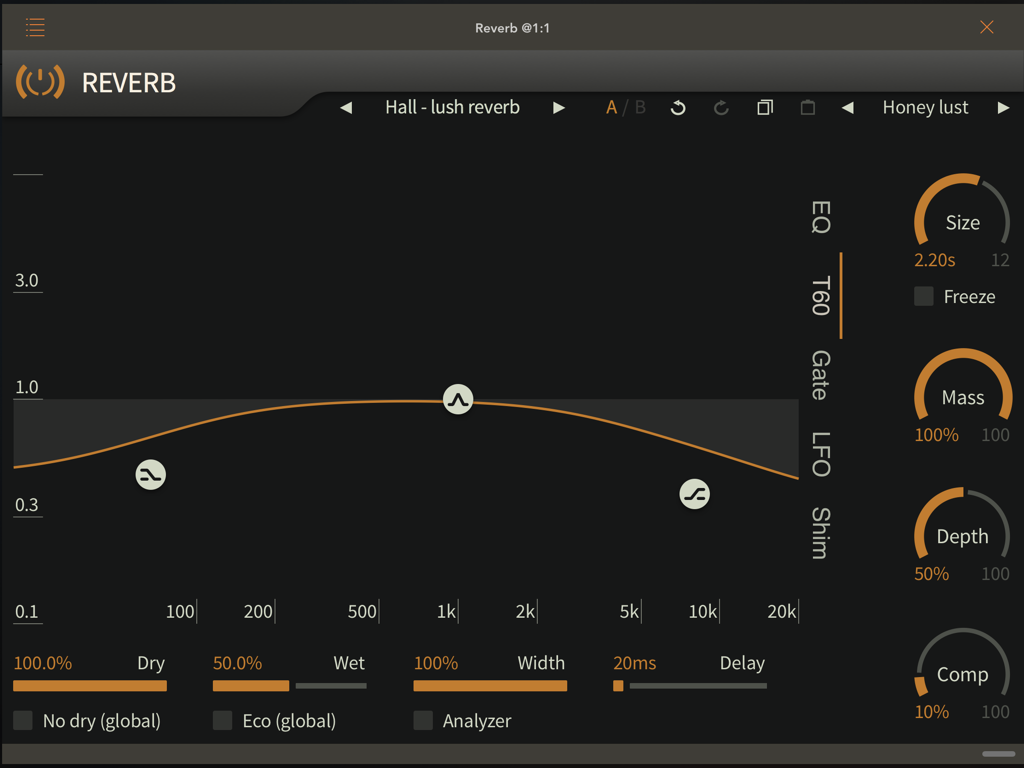
  • Size parameter + T60 Tab: T60 is for the T60 reverberation time. It is probably the most commonly used way to express the duration of reverberation in the room acoustic scientific community. It's basically the time it takes in seconds for the late reverberation to drop by 60dB compared to it's initial level. You can set this time with the'size' control (the time shown is the T60 time) and modify it as a function of frequency in the T60 tab.
  • Mass: Mass represents the density of the reveberation tail as well, going from very sparse for a low setting, to very dense for a high setting. For low settings, it sounds a bit like flutter echos, while for high values, you get a nice, dense, warm and smooth reverberation.
  • A Compressor in output: Only one knob, but great and super useful...
  • Width, Delay & Depth
  • Freeze function
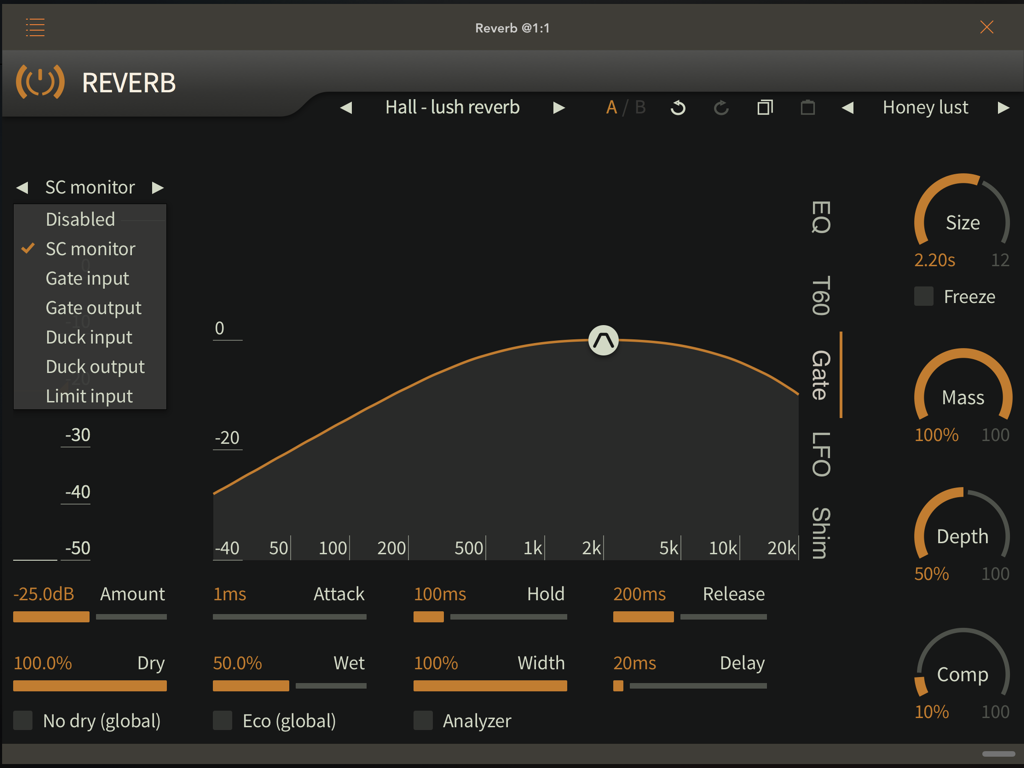
  • Gate TaB | 6 modes
  1. SC Monitor: On the right side of this Tab, a filter. Select the Side Chain Monitor and adjust it to isolate the part of the signal you want to send to the Reverb. Once this makes you select one of the 5 other modes. (Ex: when you work on a Drum loop, but you want to add Reverb only on the Snare...)
  2. Gate Input & Gate Output: By using one of these 2 modes and adjusting all the parameters of this Tab: Amount, Level, Filter, Attack, Hold & Release, you will be able to cut more or less (Amount) the Reverb just after the attack of the source signal or on the tail of the Reverb (Gate level) in a progressive or radical way. {Attack, Release, Hold)
  3. Duck Input & Duck Output: The Duck works exactly the opposite of before.
  4. Input Limit: The Reverb will be triggered as soon as the incoming signal is below your Level setting... (Kind of like the Duck)
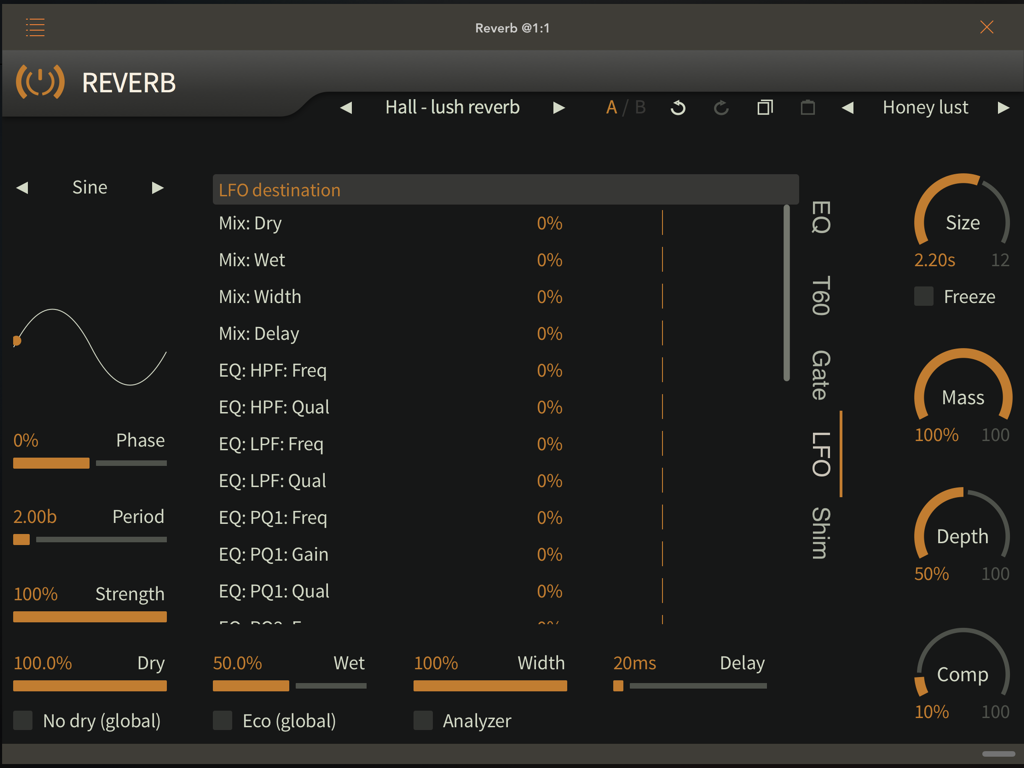
  • LFO Tab
  1. Select the type of LFO: Sine | Cosine | Saw up | Saw down | Square | Triangle | Pulse 10% | Pulse 20% | Pulse 25% | Pulse 30% | Pulse 40% | Step 4 | Step 8 |Step 16 | Rand 4 | Rand 8 | Rand 16 |Pump
  2. Then the destination: Mix: Dry | Mix: Wet | Mix: Width | Mix: Width | Mix: Delay | EQ: HPF: Freq | EQ: HPF: Qual | EQ: LPF: Freq | EQ: LPF: Qual | EQ: PQl: Gain | EQ: PQl: Qual | EQ: PQ2: Freq | PQ2: Gain | EQ: PQ2: Qual | T60: LSH: Freq | T60: LSH: Gain | T60: LSH: Qual | T60: HSH: Freq | T60: HSH: Gain | T60: HSH: Qual | T60: PQl: Freq | T60: PQl: Gain | T60: PQl: Qual | Shim: Shift 1 | Shim: Level l Shim: Shift 2 | Shim: Level 2
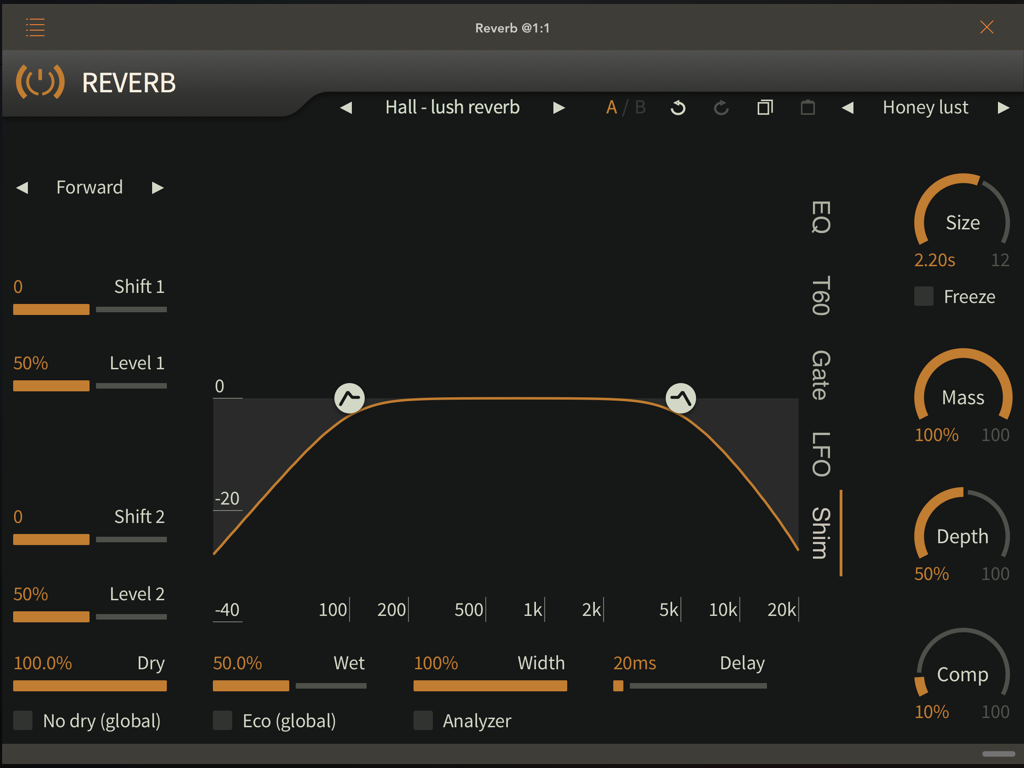
  • Shimmer 2 modes: Forward & Feedback: 2 Shimmer with for each one a Shift -12 to +12 semitones and a level.

In Conclusion
I never thought that one day I would make a video of more than half an hour on a reverb, and the worst thing is that I could have made one hour more...
When I received it and opened it, I immediately saw the Freeze switch... I was happy!
Then, the Shimmer.... So beautiful and easy to adjust....
Then I started playing with the most "Flashy" part of TB Reverb:
The LFO Tab.... Incredible!!!!!
Then the Gate Tab and her one "slaps"! La claque in French !
Then everything else, and all together....
I've been sweating this review for two days. I finished it there, now, and despite everything, I still feel a frustration... I still have a lot to do with it, to discover, to try on a lot of instruments....
TB Reverb, it's not a Reverb. It's a Reverb Channel Strip. It's a Multi Effects... "It's a Jewel!!!!

An Essential App! A Killer App! A Must Have!

Download on the App Store
Price $5.99 Author ToneBoosters Type Effect Effect type Reverb Supports Inter-App Audio (IAA), Audio Unit (AU) Stand Alone Version 1.0.2 Released 08/24/2019

Picture
Picture

Color Theme (Check out the video)
Picture
Picture
Picture
Picture
Picture

The App Store description

ToneBoosters Reverb is a studio-quality, professional reverberation plug-in with an unrivalled workflow, unlimited creative use and a gorgeous, functional user interface.

The ToneBoosters Reverb app captures the microphone input and processes the signals in real time. To use it as a plug-in, use an AUv3-compatible host app such as Steinberg Cubasis, Apple Garageband, Audio Evolution Mobile Studio, Auria, AUM, or others. ToneBoosters Reverb will appear in the list of Audio Unit extensions for effect plug-ins.

Key features:

- Studio-grade reverberation including early reflections
- The same professional sound as the acclaimed desktop version
- Full control over room size, width, density, depth, mass
- Integrated spectrum analyser showing direct and reverb simultaneously
- Integrated equalizer to shape the reverberation character
- Ability to modify reverberation time across frequency
- Compression, ducking and gating for dynamic reverberation effects
- Flexible, beat-synced LFO that can modulate almost everything!
- Dual pitch-shift shimmer module for out-of-this-world reverberation
- Reverb freeze option
- Eco mode for lower CPU load on complex projects
- Undo/redo, and A/B comparison
- Color themes for the user interface
- Max screen support in Garageband
- Legacy Inter-App Audio (IAA) support
- Optimised for iPad and compatible with iPhone and iPod Touch

What you should know:
- Inter-App Audio (IAA) can only use one instance of this app simultaneously. We recommend to use an AUv3 host to use multiple instances.
- Inter-App Audio (IAA) will only work with a single (mono) channel without an external (stereo) input source. The AUv3 version will support up to 8 channels (7.1).
- Licenses acquired for this platform are not compatible with other platforms.
- Audio Unit extensions require an iPad mini 2, iPad 4 or later models.

How to use this app as AUv3 plug-in in Apple Garageband for iOS:
https://support.apple.com/kb/PH24861?viewlocale=en_US&locale=th_TH

How to use this app as AUv3 plug-in in Steinberg Cubasis for iOS:
https://www.steinberg.net/fileadmin/files/PRODUCTS/Apps/Cubasis/Cubasis_Help/EF_Rack.html

How to use this app as AUv3 plug-in in Audio Evolution Mobile Studio for iOS:
http://www.audio-evolution.com/manual/doku.php?id=mixer_screenVersion 1.0.2 release notes- New spectrum analyzer mode showing direct and reverb spectrum simultaneously - Various usability and stability improvements
3 Comments
Frederick
8/30/2019 06:29:25 am

I”m a sucker for a good reverb and this one sounds great 👍🏻

Reply
Ed
8/30/2019 08:14:45 am

Yes.. You can go for it without any hesitation.. The Shimmer FX is beautiful... The Reverb quality awesome and the possibilities unlimited...
You can even try some rhythmic with your bass,..

Reply
Jake K
8/31/2019 02:46:08 pm

Killer Reverb for sure 😎.⭐️⭐️⭐️⭐️⭐️

Reply

Your comment will be posted after it is approved.


Leave a Reply.

    Author

    Ed
    Artistic Producer
    Composer
    Sound Engineer
     
    Band
    Black Buddha Saraband
    Nina Hagen
    popdod

    Archives

    December 2019
    November 2019
    October 2019
    September 2019
    August 2019
    July 2019
    June 2019
    May 2019
    August 2018
    July 2018
    June 2018
    May 2018
    February 2018
    January 2018
    December 2017
    November 2017
    October 2017
    September 2017
    August 2017
    July 2017

    RSS Feed

    Picture
    Picture
    Picture
    Picture
    Picture
    Picture
    Picture
    Picture
    Picture
    Picture
    Picture
    Picture
    Picture
    Picture
    Picture
    Picture
    Picture
    Picture
    Picture
    Picture
    Picture
    Because I can read everywhere a Policy...

    1. this blog is man by a human for humans
    2. I can make some mistakes (because I am a human)
    3. Nothing will deleted or removed from this blog. For my mistakes or angers, apologies and corrections will be added if needed.
    4. You can see everyday on a banner in the What's hot today post the Apps offered by a developer...
    5. If you participate to the Sunday Contest, you will have to trust in me... But, if you like you can asked me the email list of the readers who participate to a Contest included Time and Date. I will send it to you...
    6. My rating... The first criterion is the App Store description. The last one is my taste and this is totally subjective... Each post come with a tutorial showing you all the knobs, menu, faders,.... Everything that you will be able to find in an App... I hope that this will help to make your own rating.
    7. If I really don't like an App, don't understand it or found too many bugs, I send an email to the developer.... I asked him if the App will be update shortly, I also offer my services as Beta Tester.... Most of the time, I will wait for a future update... Developers are humans too!...
    8. All comments will be publish here. For insults, offenses or very bad mood, the only restriction is that you have to sign with your real name...
    9. I don't know... Peraphs that I will add something later.
Powered by Create your own unique website with customizable templates.
  • 3
  • Home
  • Blog
  • All Apps
  • Best setup for....
  • Contact
  • Free ressources
  • Ed's world
    • Sample Packs
    • DigiStix & EG Pulse Drum Kits 1